You sit down after a long day, start your PlayStation, Xbox or Nintendo console, and suddenly notice something unusual—the fan sounds louder than before. Look closely at the vents and you may find the reason: a grey layer of dust has slowly built up around the air openings. In Indian homes, where dust can enter through windows, ceiling fans run regularly and summer temperatures can already make electronics work harder, console cleaning deserves more attention than many gamers give it.
For most gaming consoles, checking and lightly cleaning exterior dust every 1–2 months is a sensible routine, while a more thorough external cleaning can be done roughly every 3–6 months or whenever significant dust appears. Microsoft, for example, recommends regular Xbox cleaning and gives a 3–6-month interval in its current service guidance. PlayStation and Nintendo focus more on preventing dust accumulation and keeping ventilation openings clear rather than prescribing one universal schedule.
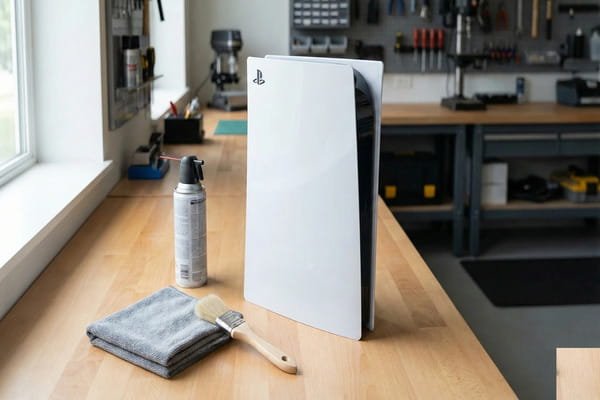
The condition of your room matters more than the calendar. A console in a dusty bedroom may need attention far sooner than one kept in a clean, air-conditioned room.
Console Dust Cleaning: Quick Overview
| Situation | Practical Cleaning Frequency |
|---|---|
| Normal home environment | Check every 1–2 months |
| General external cleaning | Around every 3–6 months |
| Very dusty room | Check every few weeks |
| Home with pets | Monthly checks are useful |
| Console near an open window | Check monthly |
| Air-conditioned clean room | Every 2–3 months may be enough |
| Visible dust on vents | Clean immediately |
| Fan becoming unusually loud | Inspect ventilation and dust |
| Console overheating | Check vents immediately |
| PS5 vents | Remove accumulated dust carefully |
| Xbox exterior | Regular cleaning; 3–6 months is official guidance |
| Internal disassembly | Only when appropriate and according to manufacturer guidance |
Is Cleaning Your Console Every Month Necessary?
Not for everyone.
If your console sits on an open TV unit in a reasonably clean room, checking it every month may reveal almost nothing.
But the inspection itself takes only seconds.
Look at the intake and exhaust vents. If you can see a noticeable layer of dust, clean it rather than waiting for an arbitrary date.
Microsoft’s Xbox Series S service guidance recommends cleaning the console every 3–6 months or whenever necessary. Sony specifically advises PS5 owners not to allow dust to build up around the vents, while Nintendo similarly warns against obstructing air intakes and vents.
This gives gamers a useful principle: inspect frequently, clean when necessary and do not allow thick dust buildup to develop.
Why Is Dust Bad for a Gaming Console?
Modern consoles produce substantial heat while gaming.
Their cooling systems depend on moving air through the console. Cool air enters, passes around heat-producing components and warm air exits.
Dust can gradually accumulate around those ventilation pathways.
A light coating does not automatically mean your console is overheating, but excessive accumulation can interfere with airflow and force the cooling system to work harder.
You may notice the fan running faster or louder during demanding games.
Both PlayStation and Nintendo explicitly recommend keeping vents unobstructed to help prevent overheating.
This becomes particularly relevant during hot Indian summers, when room temperature may already be high.
How Often Should You Clean a PS5?
For a PS5, inspect the vents every month or two, particularly if your room collects dust quickly.
Sony does not prescribe a universal monthly schedule. Instead, its official guidance says not to allow dust to accumulate on the vents.
Sony recommends disconnecting the AC power cable before cleaning and using a low-powered or handheld vacuum cleaner to remove accumulated dust around the air vents.
Current PS5 safety guidance also explains that the console covers can be removed and dust trapped underneath can be vacuumed appropriately.
However, do not start dismantling additional internal components simply because you see a little dust.
Routine cleaning should remain simple unless you know exactly what you are doing and your model’s official instructions support the procedure.
How Often Should You Clean an Xbox?
Microsoft provides particularly straightforward guidance for Xbox.
Its Series S service documentation recommends regular cleaning to remove debris and abrasive particles, with cleaning suggested every 3–6 months or whenever needed.
That is a good baseline for normal household use.
If your Xbox sits close to the floor, near a pet’s sleeping area or in a dusty entertainment cabinet, inspect it more frequently.
Before cleaning, power the console off and disconnect it from the wall.
Microsoft’s guidance warns against applying liquids directly to the console. For appropriate exterior surfaces, a soft lint-free cloth lightly dampened as directed can be used.
The important distinction is between cleaning the outside and attempting an internal hardware repair.
What About Nintendo Switch and Switch 2?
Portable and hybrid consoles need attention too.
Nintendo warns users not to block console air intakes or vents because doing so can contribute to overheating.
For Nintendo Switch systems, dusty vents should be cleared appropriately. Nintendo’s current Switch 2 safety guidance also specifically says that dust or foreign material built up on the air intakes or vents can be removed using a vacuum.
Nintendo recommends turning the console off and disconnecting cables before exterior cleaning.
For normal surface dirt, use a soft cloth according to the manufacturer’s cleaning instructions.
Avoid pouring liquids directly onto the console or submerging any part of it.
This is especially important for handheld devices because moisture can easily reach buttons, speakers and other openings.
Does Your Console Need More Cleaning in India?
Often, yes.
The frequency depends heavily on your environment.
A console in a Delhi home near an open balcony may collect dust differently from one kept in an enclosed, regularly cleaned room.
Construction work nearby, open windows, pets, carpets and smoking can all increase the amount of material entering the console.
Placement also matters.
Avoid putting the console directly on a dusty floor or deep inside a cramped TV cabinet.
Sony recommends leaving at least 10 cm of free space around PS5 ventilation areas and avoiding thick carpets and cramped spaces.
Nintendo similarly stresses adequate ventilation.
Good placement reduces the problem before cleaning is even required.
How Should You Clean Dust From Console Vents?
First, shut the console down completely.
Disconnect its power cable and accessories. If the console has recently been running a demanding game, allow it to cool before handling.
Use a soft, dry microfiber cloth to remove surface dust.
For vents, follow the instructions for your particular console. Sony permits a low-powered vacuum around PS5 vents, and Nintendo also provides vacuum-based guidance for dusty ventilation openings on relevant systems.
Avoid forcing cleaning tools deep inside ventilation slots.
Do not spray household cleaner directly into vents.
And never assume that blowing dust deeper inside the machine counts as cleaning.
Should You Use Compressed Air?
Compressed air requires caution.
A powerful uncontrolled blast can push debris further into the console or potentially affect delicate components.
Manufacturer-specific guidance should take priority over generic internet cleaning videos.
If your console’s official instructions recommend vacuuming the vent area, use that method rather than improvising with a high-pressure air source.
Also avoid using a hair dryer. Apart from moving dust unpredictably, heated air is unnecessary around temperature-sensitive electronics.
When Does a Console Need Deeper Cleaning?
A dusty vent does not automatically mean you need to open the entire console.
Consider deeper inspection when you have persistent problems such as unusually high fan noise, repeated overheating warnings or shutdowns despite the console having adequate ventilation and clean external vents.
At that stage, professional servicing may be preferable—especially if you are uncomfortable working around electronic components.
Before blaming dust, also check placement.
A perfectly clean console can still struggle if its exhaust is pushed against a wall or trapped inside a closed cabinet.
Simple Habits That Reduce Dust Buildup
Keep the area around the console clean instead of focusing only on the machine itself.
Dust the TV unit regularly and avoid positioning the console directly on the floor.
Give ventilation openings plenty of free space.
If you have pets, remove accumulated hair around the entertainment area more frequently.
Do not cover a console while it is operating. A dust cover may only be considered when the device is fully powered down and cool, and it must be removed before use.
For most gamers, the practical routine is easy: inspect vents every month or two, perform external cleaning roughly every 3–6 months, and clean sooner whenever visible dust starts accumulating.
FAQs
1. Is cleaning a console every 3 months enough?
A. For many homes, yes. Cleaning every 3–6 months can be sufficient, but inspect the vents more frequently. Dusty rooms, pets and floor-level placement may require monthly attention.
2. Can dust cause a PS5 or Xbox to overheat?
A. Heavy dust accumulation can interfere with effective ventilation and cooling. However, overheating can have other causes too, including poor placement, blocked vents or hardware problems.
3. Can I vacuum dust from console vents?
A. For certain consoles, yes. Sony recommends a low-powered vacuum for accumulated PS5 vent dust, and Nintendo also provides vacuum guidance for dusty vents on relevant systems. Follow the instructions for your exact model.
4. Should I open my console every few months to clean it?
A. Usually not. Routine exterior and vent cleaning does not require complete disassembly. If internal cleaning or repair is necessary, follow the manufacturer’s service guidance or use an authorised/qualified repair professional.